Designed for Accessibility Consultants

The HTML Audit Report Workbench
for Scalable Consulting

Stop chasing spreadsheets and screenshots. Triage findings, add manual issues that persist across rescans,
assign owners, and hand off fixes via Jira or Fixer — then export to PDF/CSV/JSON or share a read-only link for stakeholders.

Triage, Share & Export — with Consultant-Grade Control

Pluro’s HTML report page is built for real consulting workflows: filter what matters, control access by role,
and deliver outputs your clients can act on — without losing context between rescans.

  • Precision Triage Filters: Filter by type (Critical, Alerts, Manual) and by certainty (Violation vs Needs Review).
  • Standards Breakdown: Slice findings by library/standard (WCAG, BITV, or Custom rules).
  • Share (Read-Only) Links: Generate a public viewing link for non-registered stakeholders — with limited permissions and sensitive data hidden.
  • Export Options: Convert reports to PDF (tabular), CSV (report-like), or JSON for workflows and tooling.
  • Org Hub Permissions: Admins/Editors assigned to the domain can assign & edit status; Viewers can only view/filter; unassigned users have no access.
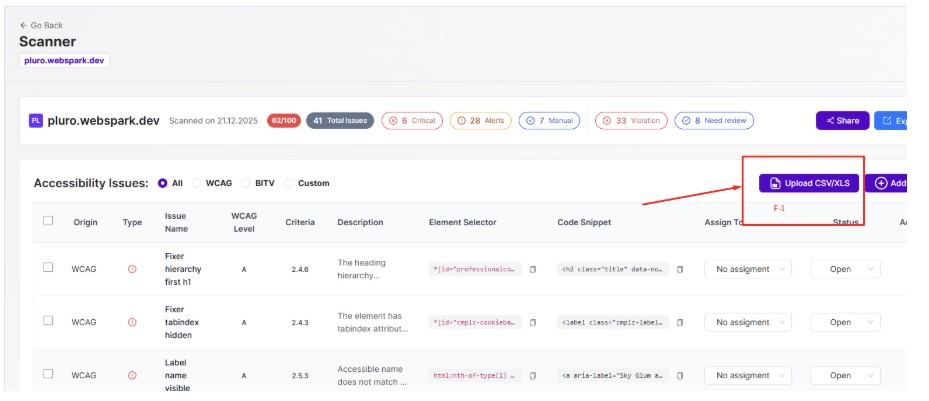
Bulk import manual accessibility findings via XLS/CSV for faster consulting workflows

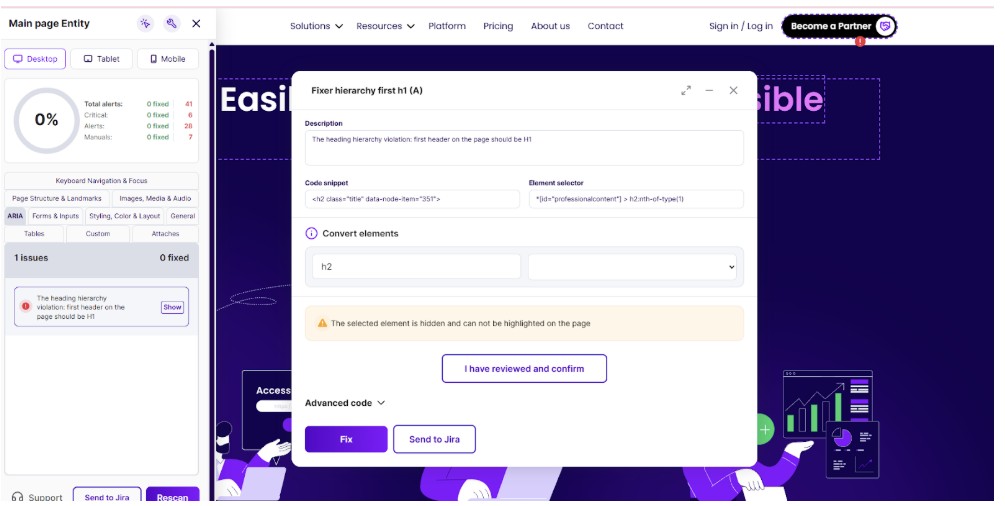
Actions menu: open details, send issues to Jira, or open the exact issue in Fixer for remediation

Turn Findings into Fixes with Evidence & Handoff

Don’t just list problems — capture actionable context and move work forward. Each report supports the full
consulting loop: documentation, ownership, and remediation handoff.

Manual Findings (That Persist)

Add consultant-created issues with a clear title, description, optional images, selector + code snippet.
Manual issues remain in the report even after the next scan.

Bulk Import for Scale

Upload an XLS/CSV to add many manual issues at once (strict format with downloadable examples) — ideal for large audits and repeatable templates.

Assign & Status Tracking

Assign issues to Org Hub members and label status so everyone knows what’s next. Assigned users get notified inside Org Hub.

Actions: Details → Jira → Fixer

Open detailed issue info, create Jira tickets (after Atlassian sync), or open the exact issue in Fixer to test and apply remediation.

Everything You Need — Inside One Report

A complete workflow from scanning to client-ready delivery and remediation handoff.

1
🧭

Scan the Entity

Generate the HTML report for any licensed page/entity from the Scanner.

2
🎛️

Triage with Filters

Filter by Critical/Alerts/Manual, then refine by Violation vs Needs Review and by WCAG/BITV/Custom rules.

3
✍️

Add or Import Manual Findings

Create consultant findings with selector + snippet + evidence, or bulk upload via XLS/CSV — and keep them across rescans.

4
📤

Share, Export & Handoff

Share a read-only report link, export to PDF/CSV/JSON, assign owners + status, and hand off remediation via Jira or Fixer.

Ready to Upgrade Your Consulting Workflow?

Deliver reports clients can act on — with triage, manual findings, ownership, and clean remediation handoff.