Severity filters
Filter by critical issues, alerts, manual findings and review status.
Designed for Accessibility Consultants
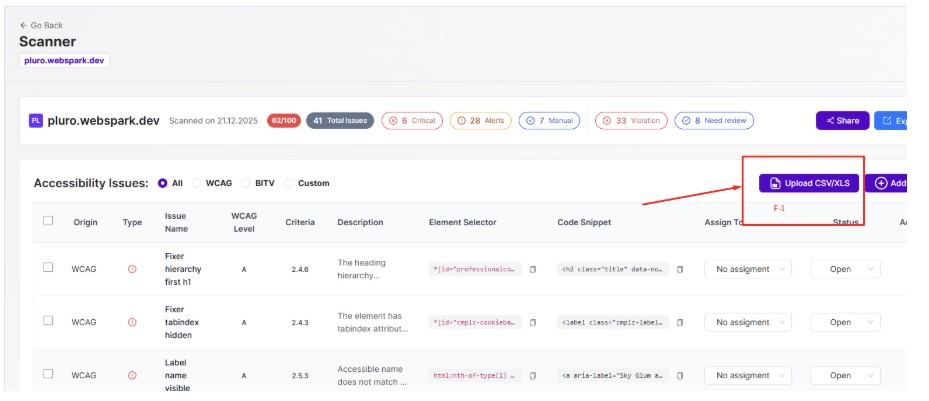
Pluro helps consultants move beyond spreadsheets and screenshots. Triage findings, add manual issues, import XLS/CSV, assign owners, attach evidence, export reports and hand off remediation through Jira or Fixer.
Built for audits, remediation projects, retainers and multi-client accessibility programs.
Consulting workflow
Accessibility audits often become a mix of scanner exports, screenshots, spreadsheets, emails and manual notes. That makes it harder to explain findings, track responsibility and show progress over time.
Consultant-grade triage
Focus on what matters, separate automated findings from manual review, and give clients a report they can understand and developers can act on.
Filter by critical issues, alerts, manual findings and review status.
Separate confirmed issues from items that require expert judgment.
Group findings by WCAG, BITV or custom rule sets.
Share focused reports without exposing unnecessary technical noise.
Manual findings
Not every important accessibility issue comes from an automated scan. Pluro lets consultants add manual findings with titles, descriptions, selectors, code snippets and visual evidence, then keep them in the report after future scans.
Report to remediation
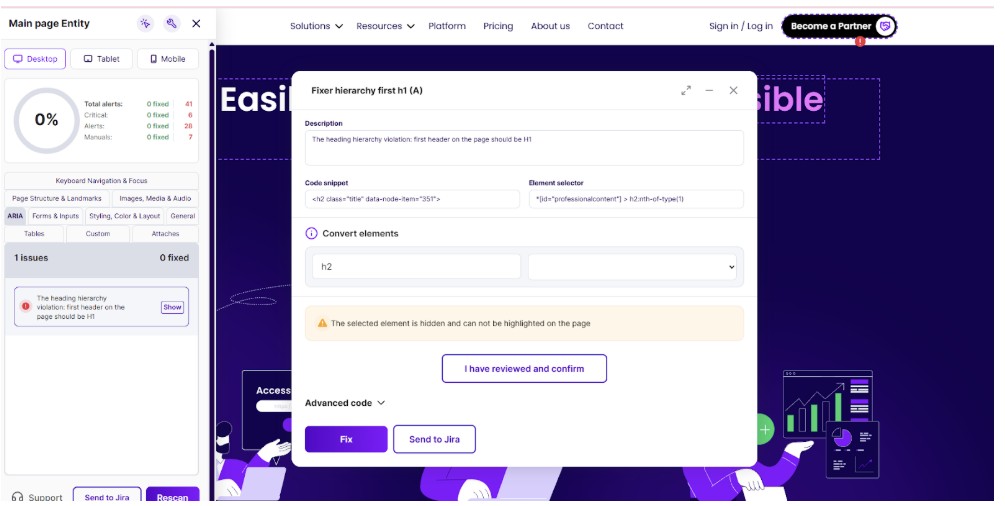
A report is only useful if the team knows what to do next. Pluro supports ownership, status tracking and remediation handoff so findings do not get stuck after delivery.
Assign findings to team members or client-side stakeholders.
Keep remediation progress visible across the project.
Create development tickets after Atlassian sync.
Move directly from the issue to the remediation workspace.
Share and export
Export reports for formal delivery, share read-only views with stakeholders, and keep technical evidence connected to every finding.
For formal client deliverables and audit documentation.
For operational tracking and project management.
For advanced workflows and integrations.
Share controlled views without giving full workspace access.
Deliver clearer reports, manage manual findings, track remediation and give every stakeholder the context they need.
