Keyboard
Dead ends and blocked paths
See where a user cannot reach, operate or leave an interface with the keyboard.
Pluro’s Chrome DevTools extension focuses on dynamic accessibility behavior. It records real interaction journeys and evaluates what happens when users open modals, submit forms, navigate menus, trigger updates, move between SPA routes, receive notifications or interact with loading and disabled states.
Run behavioral accessibility testing directly inside Chrome DevTools, then connect evidence to your Pluro workflow.
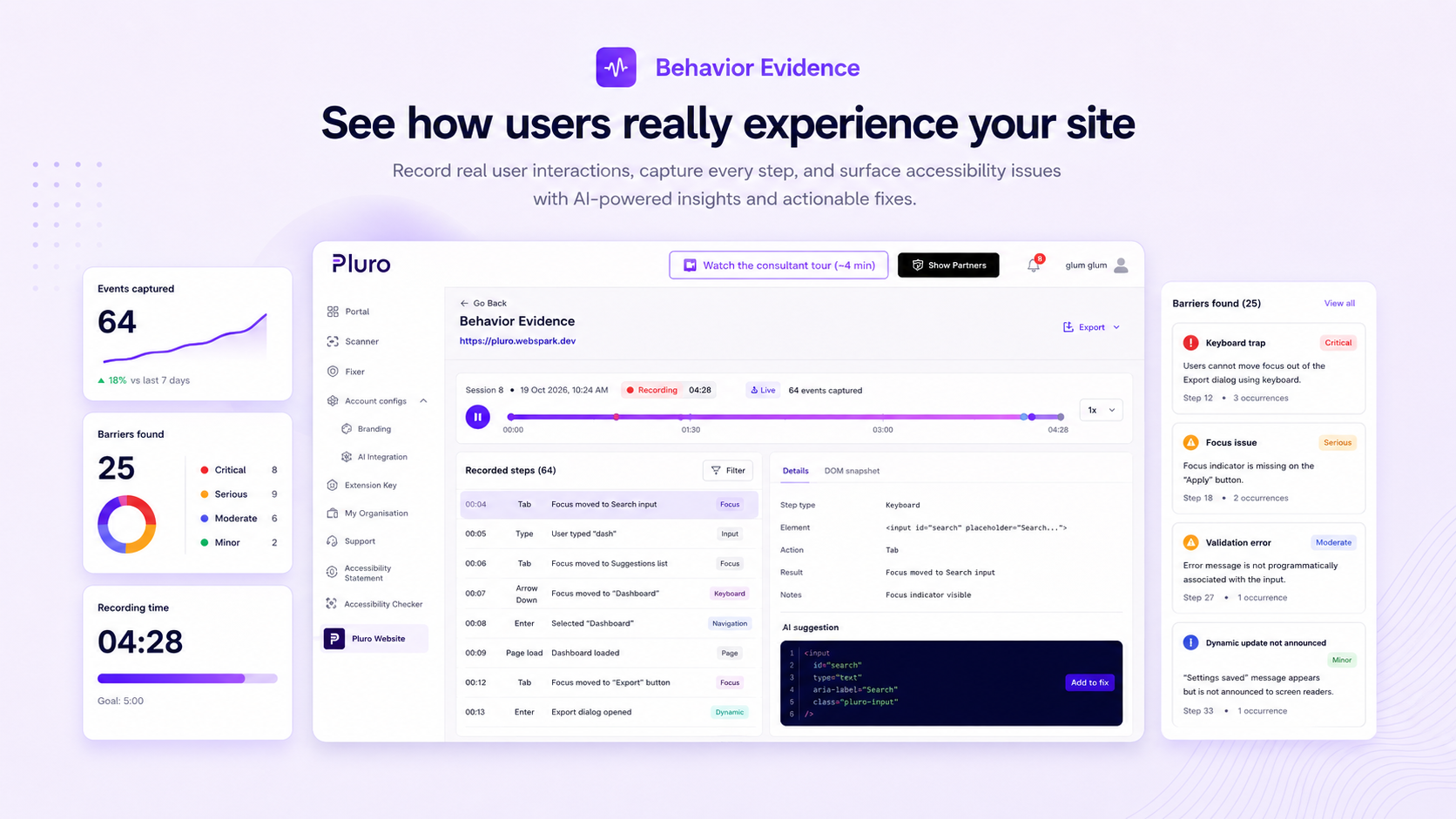 Real interactionReproducible evidence
A page may look correct in static HTML and still fail when a keyboard user opens a dialog, submits a form, moves through a menu or triggers a live update. Behavior Evidence turns those moments into a timeline teams can reproduce and fix.
Keyboard
See where a user cannot reach, operate or leave an interface with the keyboard.
Focus
Review where focus goes, whether it is visible and whether it returns after an action.
Forms
Capture validation failures that are visible but not announced or connected to fields.
Dialogs
Inspect focus trapping, initial focus, close behavior and return focus.
Dynamic UI
Document updates that occur without an appropriate announcement or context.
Evidence
Preserve the journey, events and affected interface state for the team.
Behavior Evidence is designed to support the person who discovers the problem and the person who must fix it. The result is not merely a recording; it is structured evidence connected to the affected journey, finding, remediation decision and verification result.
Developers
See the affected journey, event sequence and expected behavior before changing code.
Accessibility experts
Document issues that require judgment without losing the reasoning behind them.
Product and QA
Review whether a critical journey is usable before accepting the change.
Partners
Show clients why an issue matters and what was verified after remediation.
Managers
Move beyond scores by reviewing issues with owners, status and proof.
Enterprise
Use a repeatable approach across sites, teams and external suppliers. Complex portfolio governance may require a Custom Plan.
Behavior Evidence analyzes accessibility during real user interaction, including focus movement, keyboard operation, state changes, announcements and feedback.
Modals
Check initial focus, focus trap, focus return, Escape behavior and whether background content is hidden appropriately.
Forms
Check whether validation errors are announced and whether users are guided back to the relevant field.
Keyboard
Detect keyboard dead ends, missing activation parity and inaccessible menu, dropdown, accordion or disclosure behavior.
Dynamic updates
Check toasts, notifications, search results, filters, loading states and other interface updates.
SPA navigation
Check whether route changes in single-page applications are communicated appropriately.
Complex controls
Check disabled or loading button feedback and whether drag-and-drop interactions provide a keyboard alternative.
Walk through a real interaction scenario and see how evidence becomes a developer-ready issue and a verified result.
Record a real interaction journey and turn dynamic barriers into reproducible evidence.
